Accfin Sky
Resources

Sky Tax Knowledge Centre

Practitioner guides, workflows and tips for getting the most out of Sky Tax.

ITR14 Filing: Stop Capturing — Start Producing

How Sky Tax turns the ITR14 from a manual SARS form into a structured production process driven by the trial balance.

Many tax practitioners still prepare company tax returns directly on SARS eFiling. This is understandable. eFiling is familiar, it is the system many staff members were trained on, and it feels like the natural place to complete the return. But eFiling is essentially a manual form-completion platform.

Sky Tax is different. Sky Tax is designed to help a tax practice produce ITR14s efficiently, consistently and at scale. The return is not built by manually typing figures into SARS screens. Instead, the ITR14 is driven from the company’s trial balance.

The Trial Balance Should Drive the Return

The financial information in an ITR14 comes from the trial balance. If the trial balance is imported correctly and the accounts are linked to the correct SARS source codes, the return can be produced far more efficiently.

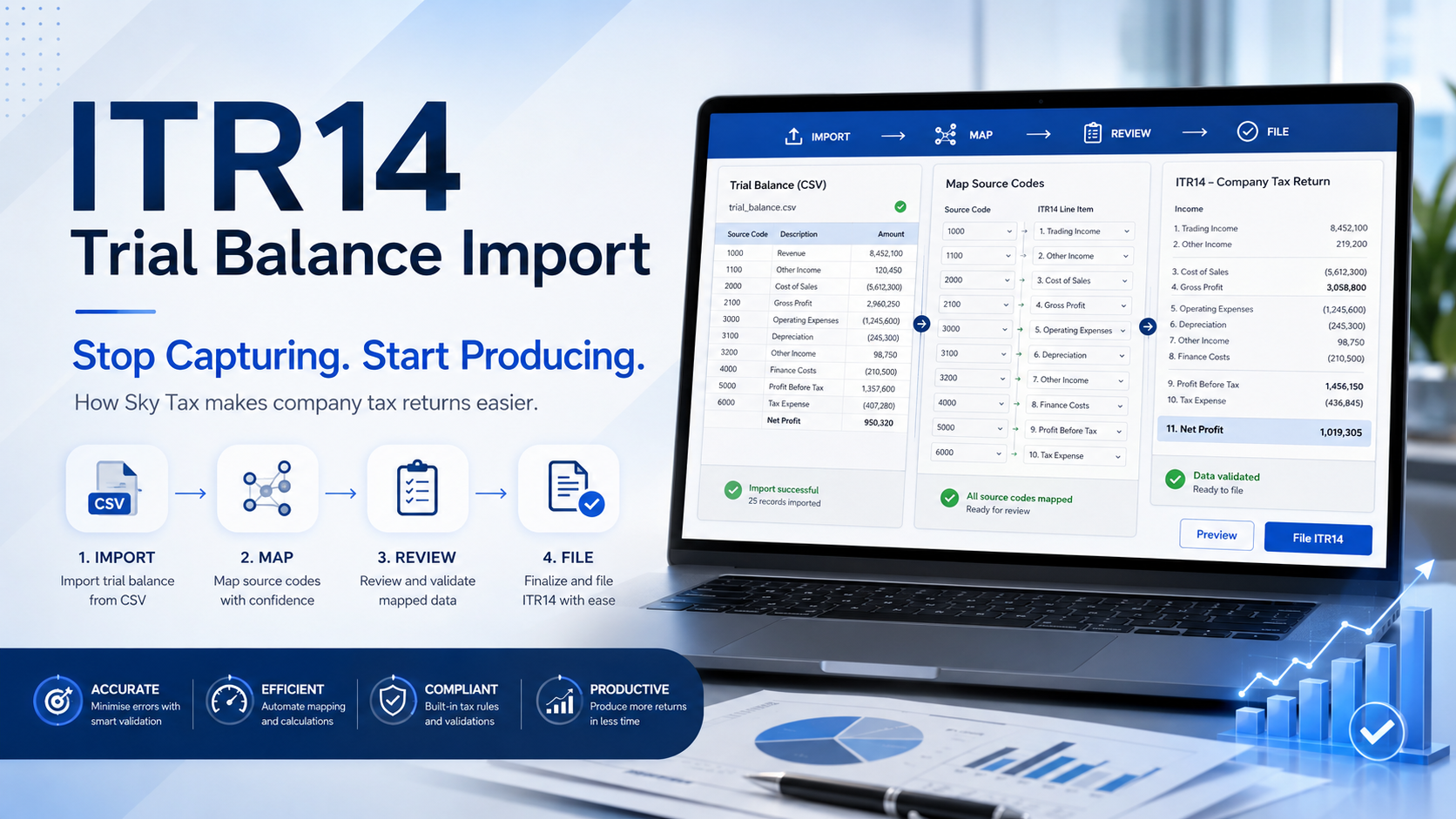
Sky Tax allows you to import the trial balance from a CSV file and map the account codes to SARS source codes. Once this mapping has been done, it can be reused in future years, making the next ITR14 even faster to prepare.

The process is simple:

  • Import the trial balance.
  • Apply or create the SARS source code mapping.
  • Review the financial information.
  • Make any required adjustments.
  • File the return.

Why This Matters for a Tax Practice

A tax practice should not be spending unnecessary time manually recapturing financial information that already exists in the accounting records. Manual capturing creates delays, increases the risk of errors, and makes it harder to standardise the work across the firm.

Sky Tax changes the process from manual completion to structured production. The practitioner remains in control. The figures can still be reviewed. Adjustments can still be made. Professional judgment is still applied. But the unnecessary typing is removed.

eFiling Is for Filing. Sky Tax Is for Production.

There is an important distinction. SARS eFiling is the official filing platform. Sky Tax is the production platform that helps the firm prepare, review and manage the return before it is submitted.

This is especially important where a firm prepares many company tax returns. The benefit is not only in one return. The benefit is in creating a repeatable process that staff can follow year after year.

Once the trial balance import and mapping process is understood, the ITR14 becomes faster, easier and more consistent.

The Key Message

Do not treat the ITR14 as a blank SARS form that must be completed manually. Treat it as a return that can be produced from the trial balance. That is the purpose of the Sky Tax ITR14 trial balance import process.

Stop typing the ITR14. Let the trial balance produce it.

Watch the ITR14 Trial Balance Import Video

Watch Import Trial Balance

Importthe Trial Balancein seconds
Accfin Software

Sky Sticky Notes: The Built-In CRM System for a Modern Tax Practice

A built-in CRM-style reminder and communication system that keeps instructions, follow-ups, and staff responsibilities attached to the taxpayer record.

A modern tax practice needs more than tax calculations and SARS submissions. It also needs proper control over follow-ups, client instructions, staff responsibilities, review points, and the permanent record of what was done.

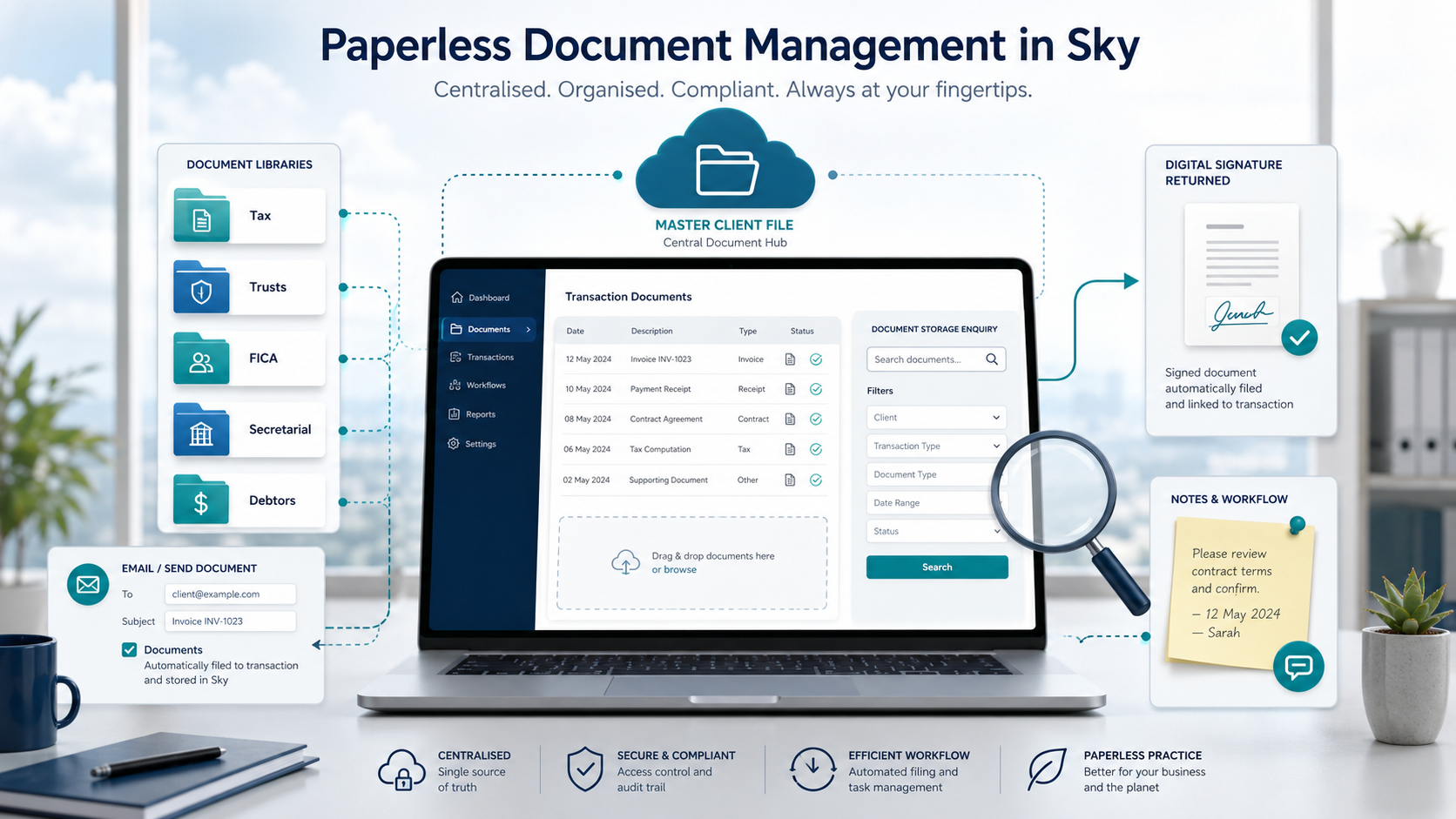
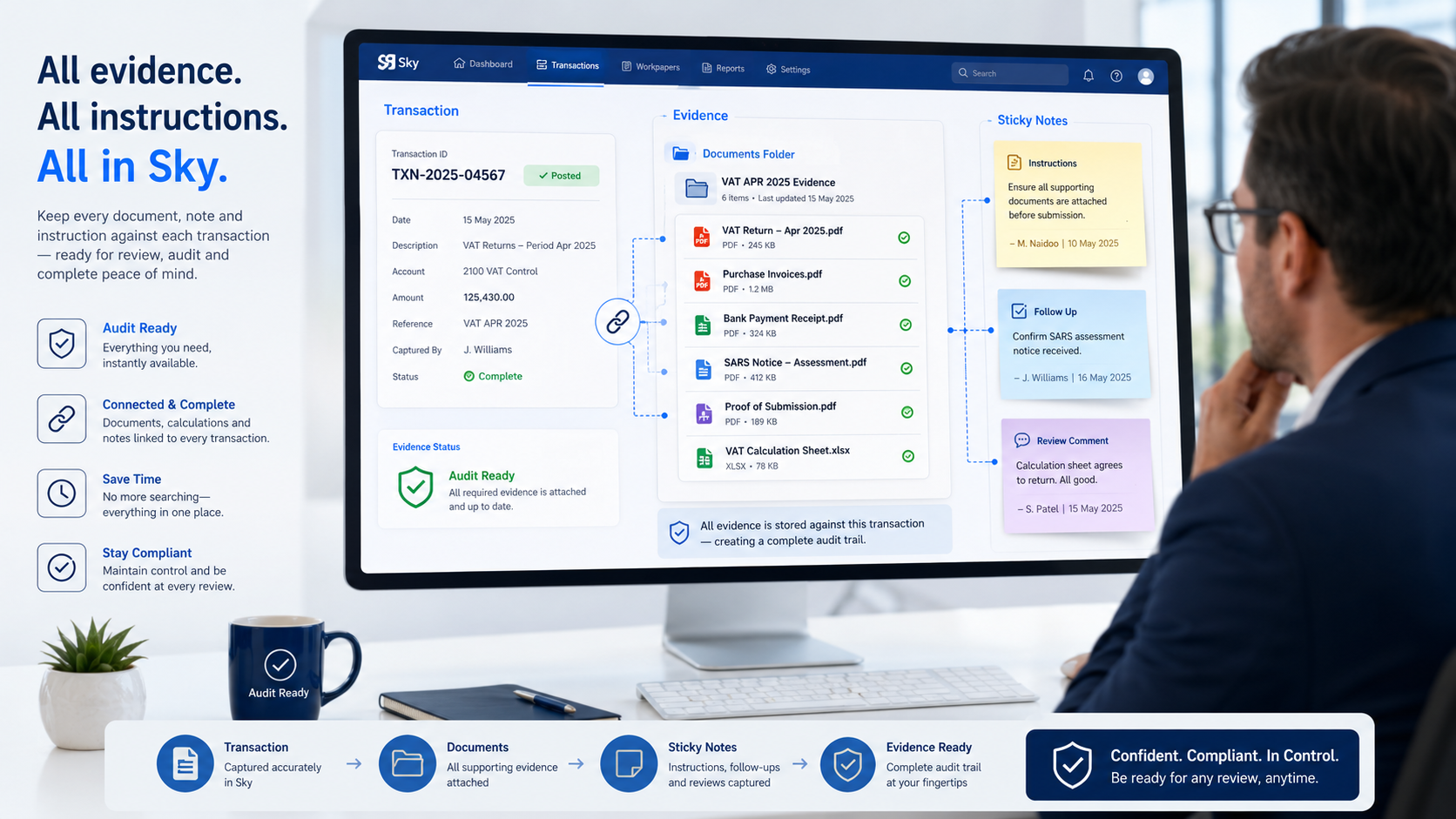
Sky Sticky Notes provide this control inside Sky Tax. They operate as a paperless CRM-style reminder and communication system that can be attached to a taxpayer, transaction, assessment, notice, provisional tax record, or other item in Sky.

This means that important information is recorded exactly where the work is being done.

Office-Wide Communication Made Simple

One of the major advantages of Sky Sticky Notes is that they can be used by everyone in the office. Sky is licensed on an unlimited user basis, which means firms can roll the system out to all staff without incurring additional user licence fees.

This is important because tax work is rarely handled by one person only. A staff member may receive client information, another person may deal with SARS, a manager may review the work, and a partner may give a final instruction. Sticky Notes allow all of these users to communicate inside the taxpayer record itself.

Instead of relying on emails, WhatsApp messages, paper notes, or verbal instructions, the communication remains attached to the relevant client or transaction in Sky.

Recording Instructions Properly

Sticky Notes are particularly important for recording instructions.

In a tax practice, instructions are often given while staff are working with client data. These instructions may relate to missing documents, SARS follow-ups, assessment queries, provisional tax decisions, review comments, client-specific issues, or matters requiring partner approval.

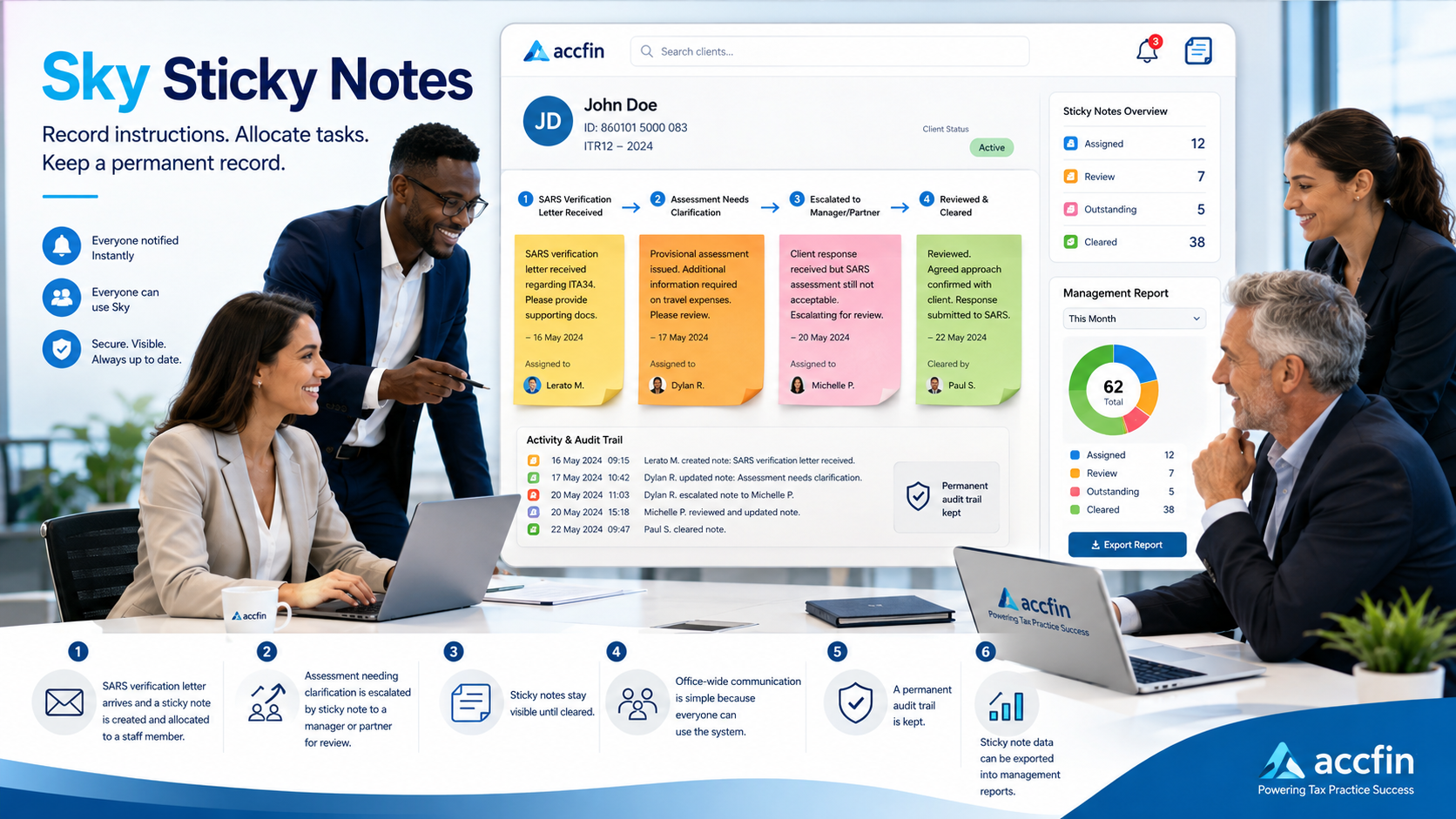
For example, if a SARS verification letter is received, a Sticky Note can be created immediately and allocated to the staff member responsible for obtaining the supporting documents or preparing the response. If the matter requires technical input, the same note can be allocated to a manager or partner for review.

Similarly, if an assessment is received and there is something that requires clarification, a Sticky Note can be attached to the taxpayer record. The note can explain the issue, allocate the matter to the correct person, and record whether the assessment must be accepted, queried, objected to, or escalated for partner review.

By recording the instruction as a Sticky Note, the instruction is kept with the taxpayer record. The person responsible can see what must be done, why it must be done, and who requested the action.

This reduces the risk of misunderstandings and lost instructions. It also creates a permanent record of the instruction, the person responsible for dealing with it, and the outcome once the note is cleared.

Better Follow-Up Control

A Sticky Note remains visible until it is cleared. This makes it an effective tool for controlling outstanding work.

A note can be used to remind a user to contact a client, follow up with SARS, obtain missing documents, review an assessment, motivate a basic amount reduction, or deal with any other matter requiring attention.

When users log into Sky, or click the red bell notification feature, they can immediately see outstanding Sticky Notes. This helps ensure that important follow-ups are not forgotten.

Clear Task Ownership

Sticky Notes can be allocated to another user. This creates clear task ownership and makes hand-overs between staff much easier.

For example, a senior staff member can allocate a note to a junior staff member to obtain information from a client. A tax manager can assign a SARS follow-up to a specific person. A partner can leave a review instruction for the person responsible for finalising the taxpayer's return.

This is particularly useful where a SARS notice or assessment needs attention. A verification letter can be allocated to the staff member dealing with the supporting documents, while an assessment that appears incorrect can be allocated to a senior staff member or partner for review and decision-making.

This turns Sticky Notes into a simple workflow system built directly into Sky Tax.

A Permanent Audit Trail

A major benefit of Sticky Notes is that they create a permanent record.

The original note, the instruction, the action taken, and the manner in which the note was cleared remain on the system. This is extremely useful in a tax practice, where it is often necessary to know what was done, when it was done, who dealt with it, and what the final outcome was.

Sticky Notes help improve internal control, staff accountability, review procedures, and practice risk management.

System activity can also create Sticky Notes automatically, particularly when notices and assessments are downloaded. This strengthens the firm's control over SARS correspondence and ensures that important events are not overlooked.

Stronger Provisional Tax and Tax Review Control

Sticky Notes are especially useful in the provisional tax process.

Where a taxpayer's basic amount needs to be reduced, or where a provisional tax payment requires review, a Sticky Note can be added to record the reason, instruction, supporting information, or required follow-up.

In the tax review screen, users can add notes directly against the taxpayer. These notes can record missing information, SARS differences, client instructions, review points, or matters that must be resolved before submission.

Because uncleared Sticky Notes can be filtered and reviewed, management can easily identify outstanding matters before important SARS deadlines.

Management Reporting

Sticky Note files can be exported from Sky and used to produce excellent management reports.

These reports can show outstanding notes, cleared notes, responsible users, follow-up items, unresolved matters, and workflow bottlenecks.

For tax managers and practice owners, this gives a practical overview of what is happening across the tax department. It becomes easier to monitor work, identify delays, follow up on unresolved matters, and ensure that client work is properly controlled.

Why Sticky Notes Matter

Sky Sticky Notes are more than reminders. They are a practical CRM and workflow tool built into Sky Tax.

They help firms:

  • Record instructions clearly
  • Keep client communication in one place
  • Allocate tasks to the correct staff member
  • Allocate SARS verification letters for action
  • Allocate assessments requiring clarification or review
  • Track outstanding follow-ups
  • Maintain a permanent audit trail
  • Improve review and sign-off procedures
  • Strengthen provisional tax control
  • Produce management reports
  • Reduce reliance on scattered emails, paper notes, and informal messages

Because Sky has an unlimited user licence model, every person in the office can participate in the same workflow process. This makes Sticky Notes an important part of running a modern, paperless, well-controlled tax practice.

For firms using Sky Tax, Sticky Notes provide a simple but powerful way to improve communication, accountability, follow-up control, and management visibility across the entire practice.