
Sky Software Technical Specification
Architecture, security, integration and deployment details for the Sky practice suite.
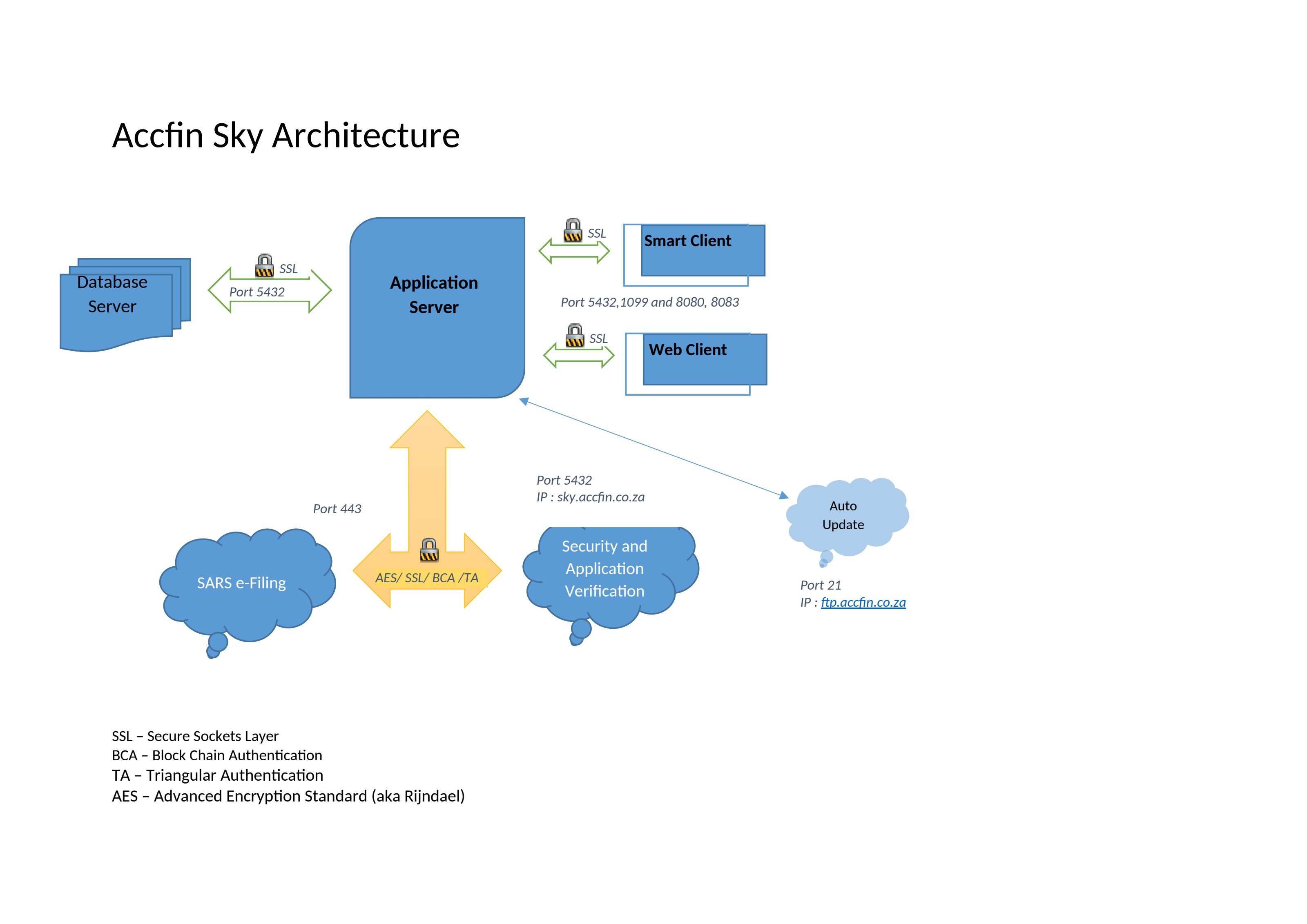
High-level architecture of the Sky Software platform and its secure integration points.
Platform overview
Sky Software is the Accfin practice platform. It is built around a single, unified practice database that keeps client, tax, secretarial, compliance, time and billing data in one place. Each Sky module draws from the same source of truth, so information entered once flows across the practice without double capture.
The platform is designed for South African accounting, tax and company secretarial firms. It combines desktop-grade productivity with modern security, remote access, automation and AI assistance.
Architecture
Client-server design
Windows practice clients connect to a central data tier, with browser-based companion tools and server-side automation services that handle imports, reminders and SARS integration.
Single source of truth
One practice database feeds every module. Master data changes propagate immediately to tax, secretarial, payroll, time and billing functions.
Modules in the suite
Sky Tax
SARS-compliant tax administration, returns, assessments and practitioner-controlled eFiling.
Sky Sec
Company secretarial management, CIPC filings, director changes and statutory registers.
Sky Time
Time recording, billing and productivity tracking for professional services.
Sky Payroll
Payroll processing, statutory returns and employee record management.
Sky FIC
FICA compliance, accountable-institution workflows and risk-based compliance.
Sky Agent
Workflow and task management for tax agents and practitioners.
AI Taxman
AI-assisted tax research, correspondence and SARS objection support.
AI Cosec
AI-assisted company secretarial guidance and documentation.
AI HR
AI-assisted employment and HR compliance guidance.
System requirements
| Item | Requirement |
|---|---|
| Practice workstations | Windows 10 or later |
| Server / hosted environment | Windows Server 2019+ or Accfin-managed hosting |
| Network | Stable internet for remote access, updates and SARS integration |
| Browser (companion tools) | Latest Chrome, Edge, Firefox or Safari |
| Display | 1920×1080 recommended for desktop modules |
| Backup | Automated daily backups to local or cloud storage |
AccfinSky Cloud Server
Accfin Software offers three cloud-based hosting options for Sky Software. Choose the model that best matches your firm's IT policy, budget and control preferences.
Shared Accfin Cloud Server
Fully managed by Accfin Software. The cost of this server is included in the pricing of Sky Software.
Virtual server
Accfin Software provides a virtual server to host your Accfin Sky Application. This option carries an additional license cost.
In-house server
Install on one of your own servers. Accfin supplies the Sky Software and Application Server; installation and management of software, databases and servers are your responsibility.
Managed cloud offerings
For Accfin-managed off-site cloud deployments, Accfin Software manages the following on your behalf:
- Hardware
- Operating system
- Bandwidth
- Server-side security
- Application server
- Databases
- Sky Software
- Backups
Self-managed on-site requirements
If you choose to host Sky Software on your own hardware, the following server specifications are recommended.
| Component | Minimum | Recommended |
|---|---|---|
| Processor | Quad Core Processor (3.5 GHz) | Intel Xeon Processor (2.1 GHz) or greater |
| Storage | 250GB HDD | 500GB SSD or greater |
| Memory | 16GB Memory | 32GB Memory or greater |
| Operating system | Windows Server 2016 | Windows Server 2019 or greater |
Client side requirements
End-users can access Sky Software through either the Smart Client or the Web Client. The requirements for each are listed below.
Smart Client
- Windows 10 or higher
- Java 8
- 8GB RAM or higher
- Intel i3 (9th Gen) or higher
Web Client
- Web browser (Google Chrome recommended)
- Screen/monitor minimum resolution 1920 × 1080
- Ethernet cable connection recommended for each device
Internet & email requirements
Internet connection
- Fibre connection of 50 Mbps or greater is recommended
- Connection must be unshaped, unlimited and unthrottled
Office 365 email
Office 365 Security Defaults is a blanket security setting that can block Sky Software from sending emails. To allow Sky Software to send out emails, disable Security Defaults in your Office 365 admin settings so that more granular authentication controls can be applied.
Security & compliance
Access control
Role-based user permissions and firm-defined access levels.
Encryption
Encrypted data in transit and at rest for sensitive practice information.
Audit trails
Detailed activity logs for compliance reviews and dispute resolution.
Backup & recovery
Scheduled backups, point-in-time recovery and disaster-tested restore.
Hosting options
On-premise, private hosted or cloud-ready deployments to match your risk model.
AI governance
Cited AI outputs, controlled prompt contexts and no unauthorised model training.
Integrations
Sky Software connects to the systems South African practitioners use every day. Supported integration points include:
- SARS eFiling and practitioner-controlled access
- CIPC for company filings, director changes and annual returns
- Bank imports and statement processing
- Accounting and invoicing package integrations
- Identity verification and FIC data sources
- Email and document management workflows